Running AI Agents in Isolated macOS VMs
How I started using Tart to give every client engagement a disposable macOS VM, creating stronger boundaries between AI coding agents and client data.

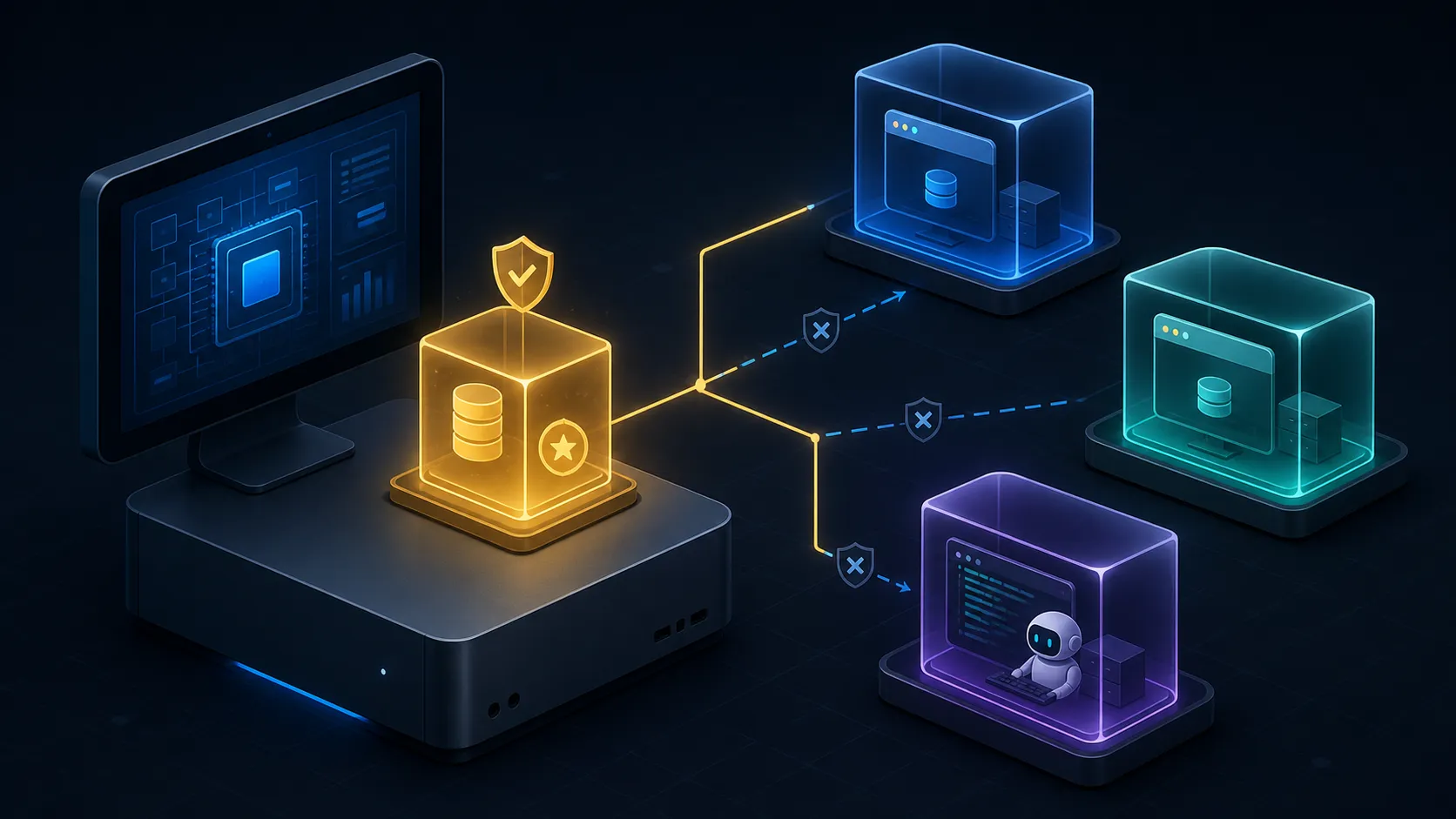
I work across several clients at once, often on my own hardware. That was manageable when the risky thing on my laptop was me. It stopped being manageable when I started handing shell access to coding agents and telling them to get on with it.
The uncomfortable moment came when I actually looked at what my home directory contained while an agent was running: three clients’ source trees, ~/.aws with more profiles than I remembered creating, ~/.ssh, a login keychain, browser profiles signed into client tenants, and agent state in ~/.claude and ~/.codex. An agent running as me could read every byte of it. Not because it was malicious, but because a wrong grep, an over-eager “let me check your config”, or a prompt injection buried in a dependency’s README is all it takes.
As a consultant, that isn’t a personal risk tolerance question. Client confidentiality is contractual. “My agent read it by accident” is not a defence I want to test.
So I stopped trying to constrain the agent and started constraining the machine it runs on. Each client engagement now gets its own disposable macOS VM, built with Tart. I have been running it this way for weeks rather than years, which is worth knowing before you copy it wholesale.
What “isolated” actually has to mean
Before reaching for a tool, it helps to name the things you are actually defending against.
| Risk | Control |
|---|---|
| Agent reads another client’s source or credentials | One VM per client, no host directory mounts |
| Agent reaches internal or home network hosts | Softnet blocks private IPv4 by default |
| Data leaves quietly via copy/paste | --no-clipboard |
| Guest talks to the host or to sibling VMs | Softnet bridge isolation, plus IPv6 disabled in the guest |
| Environment drifts and accumulates junk | Immutable golden image, disposable clones |
| Agent trashes the working environment | Delete the VM, re-clone, back in a minute |
One honest caveat, because it matters more than the rest of the post: the VM’s disk still lives on the host. This setup assumes the host Mac is trusted and running FileVault. It prevents routine cross-client leakage and it bounds what a runaway agent can touch. It is not protection against a compromised host, and it does not satisfy a client policy that forbids their data being on your physical laptop at all. If that’s the requirement, you need their hardware or their cloud, not a local VM.
Why Tart
Tart runs macOS and Linux guests on Apple silicon through Apple’s Virtualization framework. Three properties make it the right fit here:
- Base images are distributed as OCI artefacts.
ghcr.io/cirruslabs/macos-tahoe-base:latestpulls like a container image, and you can pin it by digest. - Clones are copy-on-write. A new client VM takes seconds and almost no extra disk until it starts writing.
- Isolation is a flag, not a project. Softnet networking and clipboard blocking are command-line options, so the secure path is also the easy path.
Two limits worth knowing before you commit: only two macOS guests can run at once per host, and containers don’t run inside a macOS guest at all.
The first is Apple’s, not Tart’s. Section 2B(iii) of the macOS software licence agreement grants you “up to two (2) additional copies or instances” inside virtual environments, and the Virtualization framework enforces the count. Start a third and you get The number of VMs exceeds the system limit. Tart’s maintainers point at the same clause when people ask how to get more concurrency. Software development and testing are both named as permitted purposes, so client work is fine. It’s the count that binds, and no amount of RAM buys you a third slot.
The second limit deserves its own section further down, because it’s the sharpest edge in this whole setup and it’s solvable, just not the way you’d expect.
Provisioning a client VM
Five steps, assuming you have Homebrew installed. Step 3 is the only one that takes real time, and the next section covers what goes into it.
brew install cirruslabs/cli/tart cirruslabs/cli/softnet

# 1. Pull a vanilla base image once
tart clone ghcr.io/cirruslabs/macos-tahoe-base:latest base

# 2. Size it for real work
tart set base \
  --cpu 8 \
  --memory 16384 \
  --disk-size 60 \
  --display 1440x900pt

# 3. Boot it, install your toolchain, shut down, then freeze it as a golden image
tart run base --no-clipboard --net-softnet
tart clone base golden-20260813

# 4. Per client: a copy-on-write clone off the golden image
tart clone golden-20260813 client-acme

# 5. Run it locked down
tart run client-acme --no-clipboard --net-softnet --suspendable
The flags that are present:
--net-softnetroutes the VM’s traffic through Softnet, a userspace packet filter. By default the VM can only send traffic from its own MAC address and its own DHCP-assigned IP, and only to globally routable IPv4 addresses. Private ranges are blocked, which means your router, your NAS, your work VPN subnet, the host itself, and any sibling VM are all unreachable. The agent can reach GitHub and npm. It cannot reach your home network.--no-clipboarddisables clipboard sharing between host and guest. Copy/paste is the most casual exfiltration path there is, and it’s the one you’ll reach for absent-mindedly at 11pm.--display 1440x900ptkeeps the window usable and fullscreen-safe on a Retina host.--suspendableis the prerequisite fortart suspend, which the incident-response section below leans on. It disables audio and entropy devices and switches to Mac-specific input devices. macOS guests only, and it can’t be combined with--no-trackpad,--no-keyboard, or--no-pointer.
The flags that are absent matter just as much:
- No
--dir. Nothing from the host filesystem is mounted. Clone repositories inside the guest, from the client’s approved source control. - No
--disk. No host block devices or disk images attached. - No
--net-bridged. The VM never appears as a peer on your LAN. - No
--net-softnet-allow.
That last one deserves a warning. --net-softnet-allow=0.0.0.0/0 disables Softnet’s destination restrictions entirely, including VM bridge isolation. It exists for legitimate CI use cases. It has no business anywhere near a client VM, and if you find yourself adding it to make something work, you’ve just removed the main control this whole setup rests on.
Making the golden image reproducible
The point of a golden image is that you build the environment once, verify it, and then never modify it again. Client VMs are clones; when one goes wrong you throw it away rather than repair it.
The golden image is provisioned from a Brewfile:
brew "git"
brew "jq"
brew "mise"
brew "atuin"
brew "starship"
brew "worktrunk"
brew "zoxide"

cask "ghostty"
cask "docker"
cask "google-chrome"
cask "visual-studio-code"
You can drive that from the host rather than clicking around in the VM window:
tart run client-acme \
  --no-graphics \
  --no-clipboard \
  --net-softnet &

# tart ip returns nothing until the guest has booted and taken a DHCP lease
ip=$(tart ip client-acme --wait 120)
ssh "admin@$ip" 'brew bundle --file=-' < Brewfile
The --wait matters. Without it, tart ip runs against a VM that is still booting, returns empty, and the ssh line fails against a nonsense host. tart exec works too if you’d rather not deal with SSH keys.
One side benefit of provisioning this way is that the Brewfile is the approved software list. When a client asks what runs on the machine handling their code, the answer is a file in version control, not an archaeology exercise on my laptop. Anything not in it isn’t on the image, and adding something is a visible, reviewable change rather than a brew install I forget about by Thursday. Agent CLIs are conspicuously absent from that list for exactly this reason. They get installed per client, against that client’s approval, not baked in for everyone.
The rules that make the image safe to reuse across clients are all about what you leave out:
- No credentials, ever. No SSH keys, no cloud profiles, no API tokens, no keychain entries.
- No signed-in accounts. Don’t log into Chrome, don’t enable browser sync, don’t turn on VS Code Settings Sync while building the image.
- No agent CLIs. Claude Code and Codex are installed and authenticated inside the client clone, using only the tools that client has approved. Never copy
~/.claudeor~/.codexbetween VMs, because those directories hold session history from other engagements. - Pin the upstream image by digest, not
:latest, and refresh it deliberately. Otherwise “rebuild the golden image” quietly means “get whatever shipped this week”. - Date the image name.
golden-20260813tells you exactly what a VM was cloned from, and lets you keep the previous validated image around until every new clone is verified.
I wrap the whole lifecycle in mise tasks (vm:create, vm:start, vm:doctor, vm:destroy), because the difference between a good practice and an actual habit is whether it’s one command. vm:doctor re-checks the invariants (IPv6 off, automatic login disabled, guest FileVault on) and fails loudly when a VM has drifted.
The hardening the flags don’t cover
Tart’s flags handle the host boundary. A few things still need doing inside the guest.
Disable IPv6 on every network service. Softnet filters IPv4 only, so IPv6 is a way around the private-address restriction. Turn it off everywhere by running this in a shell inside the VM:
networksetup -listallnetworkservices | tail -n +2 | while read -r svc; do
  sudo networksetup -setv6off "${svc#\*}"
done
Turn off automatic login and set a real password. Base images ship with automatic login enabled for automation convenience, which is exactly wrong for a machine holding client data:
sudo sysadminctl -autologin off
sudo sysadminctl -autologin status
Then change your user’s password and enable FileVault in the guest, and store the recovery key in an approved password manager. Keep those credentials local to the guest. The whole model depends on a compromised VM not holding anything that unlocks something else.
One trap here is host-side, not guest-side. Since macOS 15, the Virtualization framework wants an unlocked login.keychain on the host before it will start a VM at all, and fails with errors like Failed to generate keypair when there isn’t one. It never bites while you’re sitting in front of the machine, logged in graphically. It bites the moment you drive Tart over SSH on a host nobody has logged into since it rebooted. Tart’s FAQ has the workarounds.
Close the remote-access doors the base image leaves open. This is worth knowing before you trust a clone with anything: the Cirrus Labs base images ship with the account admin, the password admin, Remote Login enabled, Screen Sharing enabled, and Gatekeeper disabled. Every one of those is a sensible choice for a CI runner that gets destroyed after each build. Every one is wrong for a machine holding a client’s source. Run this in the guest as the last step before you freeze the golden image:
sudo systemsetup -f -setremotelogin off
sudo launchctl disable system/com.apple.screensharing
sudo spctl --global-enable
The SSH bootstrap I showed earlier happens during the image build, before this runs. Afterwards, provisioning goes through tart exec or the VM window.
Be clear about what this does and doesn’t buy you. It does not defend the guest against the host. The host owns the hypervisor: it can read the disk, snapshot RAM with tart suspend, and run commands in the guest with tart exec, which goes through the Tart Guest Agent and doesn’t care whether SSH is switched off. The host is inside the trust boundary by definition, and no guest setting changes that.
What it closes is the casual path, where anything running as your user on the host can shell into a VM using a password that is published in a public Packer template.
Which points at the rule this whole setup has been implying: don’t run agents on the host. A host-side agent with shell access can tart exec into every client VM you own, simultaneously, which is exactly the blast radius the VMs exist to prevent. I have pared the host back to tart, a browser, and very little else. The interesting work happens one layer down.
Keep history and settings local. Atuin is excellent, but shell history synced off the machine is client command history leaving the boundary. Don’t run atuin login unless the client has explicitly agreed. Same for editor Settings Sync.
The container problem, stated plainly
No Linux container runtime works inside a macOS guest on Apple’s Virtualization framework. Not Docker Desktop, not Colima, not Podman, not OrbStack. They all boot a Linux VM to act as the container host, and starting a VM inside a VM needs nested virtualization.
This is worth being precise about, because it’s easy to blame the wrong layer: the limit belongs to Apple’s Virtualization framework, not to Tart. Any tool built on that framework inherits it, so switching to a different Tart-alike won’t help either. Per Tart’s FAQ, nested virtualization requires an M3 or later chip running macOS 15 or later, and it is supported for Linux guests only. A macOS guest doesn’t get it. You can confirm inside the VM:
sysctl -n kern.hv_support # 0 means Hypervisor.framework is unavailable, so no container runtimeI’m stating this bluntly to save you an afternoon. Swapping Docker Desktop for Podman or Colima will not help, because the constraint isn’t the container tool or the VM tool, it’s the hypervisor underneath both.
Four ways around it, in the order I’d reach for them:
- Check whether you need a container at all. This is the one people skip. A surprising amount of what ends up in a
docker-compose.ymlhas a perfectly good native macOS install: Postgres, Redis, and RabbitMQ are all onebrew install, and Azurite, the Azure Storage emulator, is a Node package you install withnpm install -g azurite. Running those directly in the client VM keeps everything inside one boundary and skips this problem entirely. It doesn’t always work out. Seq, which I reach for constantly, is supported on Windows or under Docker and Linux, so on macOS it wants a container and pushes you to the next option. - A separate Linux Tart VM. Tart runs Linux guests happily, and a Linux VM on the host is native virtualization with no nesting involved, so containers work normally inside it. The wrinkle is that Softnet blocks private IPv4, so your macOS client VM cannot reach that Linux VM without relaxing the isolation that this whole setup depends on. This is the approach I use for the leftovers, and it’s worth being deliberate about how small you keep that hole.
- A remote Docker host, or the client’s own CI, if the container work is really build and test rather than local iteration.
- Accept the exception. Do container work outside the per-client boundary and write down that you’re doing it. A documented exception you can explain to a client beats an undocumented workaround you’ve forgotten about.
Whichever way you go, the principle is the same: a /32 to one known peer is a deliberate, auditable exception, and 0.0.0.0/0 is the end of the isolation model.
Running the sidecar
Each client gets a pair of VMs, not one. There’s the macOS VM I work in, and next to it a Debian sidecar running the Docker engine, pinned to a digest like every other image here:
  client-acme (macOS)                client-acme-docker (Debian)
  8 CPU / 16 GB / 60 GB              4 CPU / 8 GB / 40 GB
  docker CLI, no engine     ssh      dockerd, no TCP socket
         └──────────────────────────────────┘
              one /32 hole, both directions
The pair is per client, so the sidecar is destroyed and recreated with the client VM and never outlives the engagement. Two clients never share a Docker daemon, an image cache, or a volume. Apple’s two-guest limit applies to macOS guests, and the sidecar is Linux, so the pair doesn’t cost a macOS slot.
The network hole, made as small as I can make it. Both VMs still run under Softnet. Each is allowed to reach exactly one private address: the other one.
tart run client-acme \
  --no-clipboard \
  --suspendable \
  --net-softnet \
  --net-softnet-allow="$sidecar_ip/32"

tart run client-acme-docker \
  --no-clipboard \
  --net-softnet \
  --net-softnet-allow="$client_ip/32"
Docker over SSH, never over TCP. The client VM has the Docker CLI and no engine. It talks to the sidecar through an SSH context:
docker context create client-sidecar \
  --docker host=ssh://client-acme-docker
docker context use client-sidecar
docker build, docker compose up, and everything else then behave normally, while the daemon lives one VM away.
The engine never listens on a TCP socket. There is no 2375, no 2376, no TLS certificate management, and nothing to accidentally expose. Access is a single ed25519 key generated for that pair, and the sidecar’s sshd is configured to accept nothing else:
PasswordAuthentication no
KbdInteractiveAuthentication no
PermitRootLogin no
PubkeyAuthentication yes
AllowUsers docker
The sidecar’s host key is pinned into the client’s known_hosts with StrictHostKeyChecking yes at provisioning time, so a swapped sidecar fails loudly instead of prompting. Host keys are regenerated per VM, because clones would otherwise all share the base image’s.
Firewalling the sidecar takes two layers, because Docker needs both.
ufw handles VM-level ingress: deny by default, allow the paired client to reach port 22 and nothing else.
ufw default deny incoming
ufw default allow outgoing
ufw allow from "$client_ip" to any port 22 proto tcp
That isn’t sufficient on its own. Docker inserts its own iptables rules that bypass ufw entirely, which is documented behaviour and still widely misunderstood. Containers that publish ports end up reachable even though ufw says the door is shut. The fix is the DOCKER-USER chain, which Docker leaves for exactly this:
iptables -A DOCKER-USER \
  -m conntrack \
  --ctstate RELATED,ESTABLISHED \
  -j ACCEPT
iptables -A DOCKER-USER -i docker0 -j ACCEPT
iptables -A DOCKER-USER -i br+ -j ACCEPT
iptables -A DOCKER-USER -s "$client_ip/32" -j ACCEPT
iptables -A DOCKER-USER -j DROP
Containers keep their egress and can still talk to each other, the paired client VM gets through, and everything else is dropped. IPv6 is disabled on the sidecar with sysctl for the same reason it’s disabled on the macOS guests: Softnet only filters IPv4.
A health check asserts all of this, including that nothing is listening on 2375 or 2376, and runs as part of vm:doctor. Firewall rules that quietly stop applying are worse than no firewall rules, because you keep believing in them.
One guardrail that isn’t technical
Each client VM gets a generated wallpaper with the client’s name in large type and a stable per-client colour, applied to every desktop.
It sounds trivial next to packet filters, but I added it as a guardrail against one of the easiest mistakes to make. When you’re three VMs deep at the end of a long day, the question that gets you into trouble isn’t “can this VM reach that network”, it’s “wait, which client am I in right now”. A wall of colour and a name answers that before you type a command into the wrong VM.
When an agent goes rogue
This is the part that changes how you work, because it turns an incident into a chore.
1. Freeze it. If you want to understand what happened, capture the machine before anything is lost:
tart suspend client-acmeThat pauses the guest and snapshots RAM, CPU registers, and device state to disk. Processes, open files, and network state are all preserved for inspection.
This only works if the VM was started with --suspendable, which is why that flag is on the tart run line earlier. Without it, tart suspend still signals the tart run process, but the process checks the VM’s configuration, finds it can’t save and restore, and gives up. Mid-incident is a bad time to learn that. With the flag set, closing the VM window suspends the guest instead of stopping it.
2. Cut it off. If you’d rather stop the bleeding than study it:
tart stop client-acmeA hard stop is fine. The VM is disposable, and nothing outside it is mid-write.
3. Establish the blast radius. This is the step that’s normally expensive and here is almost free. Nothing was mounted, so the host filesystem is untouched by construction, not because you checked, but because there was never a path. No other client’s VM was reachable, because Softnet blocked the private address space. Whatever the agent did, it did inside one disk image.
4. Reset. You don’t repair the VM. You delete it:
tart delete client-acme
tart clone golden-20260813 client-acme
Under a minute to a known-good machine, because the golden image is immutable and the work lives in remote source control, not in the VM. This only holds if you commit and push often, which, when you’re running agents, you should be doing anyway.
5. Rotate what it held. Revoke the tokens and keys that lived in that VM. This is bounded specifically because credentials were local to the guest and client-scoped. There’s no “and also every other client’s credentials” tail to chase.
The real win isn’t any single control. It’s that recovery becomes a routine command instead of an incident report. That’s what makes it defensible to run an agent with wide permissions in the first place. Not that nothing can go wrong, but that when it does, the answer is tart delete rather than a disclosure conversation.
What it costs
Nothing here is free, and it would be dishonest to pretend otherwise:
- Disk. Around 60 GB provisioned per client VM. Copy-on-write means you don’t pay it all upfront, and a VM that only holds a repo and a toolchain stays well under that. Note that Tart can only grow a disk, never shrink it, so start smaller than you think you need.
- Setup time. The golden image takes a while to build the first time. Clones are fast.
- No clipboard, no mounts. You will paste something into the wrong place, realise it can’t get there, and be mildly annoyed. That annoyance is the control working.
- Two running macOS VMs. Apple’s licence limit, enforced by the framework. If you need three clients live at once, you’re stopping one.
- No containers inside the guest. Nested virtualization is for Linux guests only, so Docker and every alternative to it are out. A Linux sidecar VM solves it, at the cost of a second VM per client (another 40 GB) and a deliberate
/32hole in the network isolation.
Per-client VMs are the price of running agents with broad permissions and still sleeping properly. I think it’s cheap.
Conclusion
I didn’t start building this because I expected an agent to turn hostile. I started because I couldn’t honestly answer the question “what could this thing reach right now”, and as a consultant that’s a question I should always be able to answer.
Key takeaways:
- One VM per client removes cross-client exposure by construction, not by discipline.
- Softnet blocks private IPv4 by default, so the agent gets the internet and nothing on your network.
- No
--dir, no--disk, no clipboard keeps the host boundary intact. - An immutable golden image makes every client VM identical, auditable, and disposable.
- The approved software list is a file you can point at. The Brewfile is the inventory, so “what’s installed on the machine touching our data” has a one-line answer, and anything a client hasn’t approved is visibly not in it.
- Guest-side work still matters: IPv6 off, automatic login off, Remote Login and Screen Sharing off, Gatekeeper back on, FileVault on, history local.
- Don’t run agents on the host. The host can reach into every VM with
tart execno matter how the guest is configured, so keep it boring. - Containers need a Linux sidecar VM per client, reached over SSH through a single
/32Softnet exception. Narrow, auditable holes are fine.0.0.0.0/0is not. - Recovery is
tart deleteplustart clone, which is what turns a rogue agent from an incident into a chore.
References: Tart, Tart on GitHub, Softnet, and the macOS image templates the base images are built from.
Comments
Join the conversation on Bluesky.